Tomcat SSL Tips - Strengthening Your Encryption for 2025
Why SSL Configuration Matters for Tomcat
With POODLE making headlines, it became clear that a strong SSL configuration is essential for securing web servers. If you’re running Apache Tomcat, ensuring your SSL settings are up to modern security standards is crucial. This guide walks you through improving your Tomcat SSL configuration to mitigate vulnerabilities, optimize encryption, and achieve a better SSL Labs score.
Assessing Your Tomcat SSL Setup
Before making changes, it’s helpful to analyze your current SSL configuration. One of the best tools for this is Qualys SSL Labs, which assigns letter grades based on encryption strength, protocol support, and vulnerability exposure.
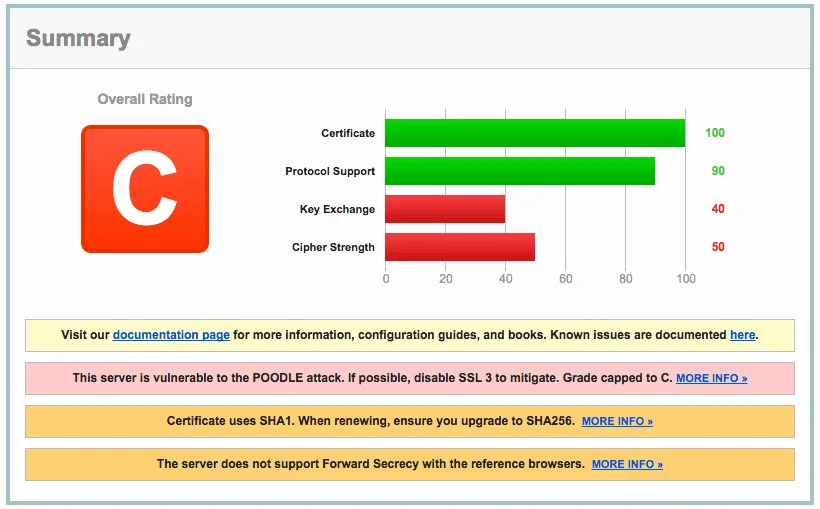
When I initially tested my Apache Tomcat 8 server, I received a C grade. This was due to:
- SSLv3 support, which left it vulnerable to POODLE
- Lack of Forward Secrecy, reducing overall encryption strength
Steps to Improve Your Tomcat SSL Security
1. Disable SSLv3 to Mitigate POODLE
POODLE (Padding Oracle On Downgraded Legacy Encryption) exploits weaknesses in SSLv3, allowing attackers to decrypt secure connections. To fix this, we need to disable SSLv3 in Tomcat’s server.xml configuration file.
2. Restrict Supported SSL/TLS Protocols
Instead of allowing all SSL versions, restrict Tomcat to modern, secure protocols by setting sslEnabledProtocols to only TLS 1.2 and higher.
3. Use a Strong Cipher Suite
By default, Tomcat may allow weak ciphers. To improve security, define a custom list of strong ciphers in server.xml. The following example provides an optimized configuration:
<Connector port="443" protocol="HTTP/1.1" SSLEnabled="true"
    maxThreads="150" scheme="https" secure="true" clientAuth="false"
    sslProtocol="TLS"
    sslEnabledProtocols="TLSv1.2,TLSv1.3"
    ciphers="TLS_AES_128_GCM_SHA256,
    TLS_AES_256_GCM_SHA384,
    TLS_ECDHE_RSA_WITH_AES_128_GCM_SHA256,
    TLS_ECDHE_RSA_WITH_AES_256_GCM_SHA384" />
4. Enable Forward Secrecy
Forward Secrecy (FS) ensures that even if a server’s private key is compromised, past communications remain encrypted. To achieve this:
- Prioritize ECDHE (Elliptic Curve Diffie-Hellman Ephemeral) ciphers
- Ensure your Java version supports modern cipher suites
5. Apply and Test Your Changes
After modifying server.xml, restart Tomcat and retest your server’s security score using SSL Labs.
Results: From a C to an A-
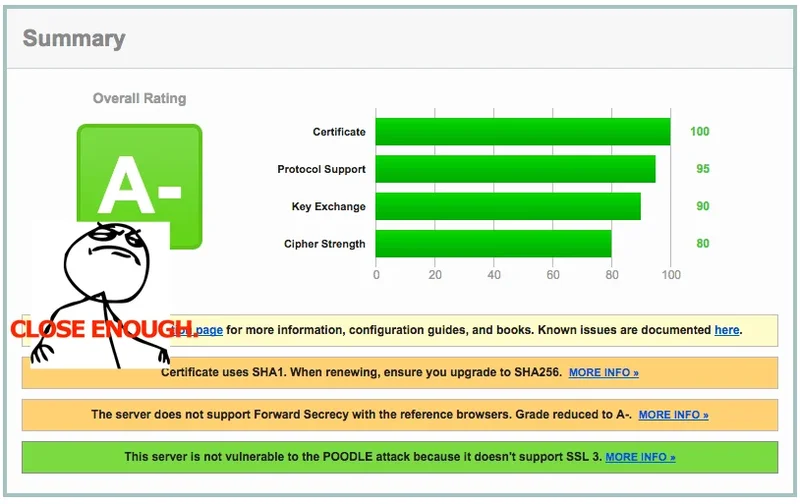
After implementing these changes, my SSL Labs score improved from C to A-. The biggest improvements came from:
- Disabling SSLv3, mitigating POODLE
- Restricting SSL/TLS versions, eliminating older, insecure protocols
- Using modern ciphers, increasing encryption strength
Why Not an A+?
While my encryption strength improved, I couldn’t achieve an A+ because:
- Forward Secrecy wasn’t available in all reference browsers
- Strict compatibility settings broke support for some older clients
If an A+ rating is a priority, consider further restricting ciphers and enabling HSTS (HTTP Strict Transport Security).
Additional Resources
Want to go deeper? Check out these resources:
- SSL Labs Guide: SSL/TLS Deployment Best Practices
- Tomcat Security: Apache Tomcat SSL Configuration
- Hands-On Learning: Tomcat Security & Hardening Course
Final Thoughts
Optimizing Tomcat’s SSL configuration isn’t just about getting a higher score—it’s about securing your users’ data. By following these steps, you can protect against known vulnerabilities and future-proof your server. Have questions or additional tips? Drop them in the comments below!